
- Published on
Why I Switched from Vercel and Supabase to Cloudflare Workers
- Authors

- Name
- Westin Tanley
- @HiWestin
I have been sitting on a pile of domains for years. Some I bought with ideas that never shipped. Some are leftovers from businesses that did not work out. A few I just grabbed because the name was good and the price was right.
Last month I decided to do something with them. The idea is simple: a marketplace where I can list these domains and sell them for extra cash. I called it c22k.com.
Then came the real decision: what to build it with.

The Problem With My Usual Stack
My default is Vercel and Supabase. I have used that combination for years. It works. But two things happened at the same time.
Supabase's free plan covers two projects, and I am already using them. On top of that, my existing databases are growing. I could see myself hitting the free plan limits before long. Starting another project there and watching the usage tick up felt like the wrong move. And my Vercel bill has been climbing as my other sites grow. More visitors means more function invocations, more bandwidth, more line items.
To be clear, paying for Supabase is not a bad idea. Their infrastructure is solid, the product experience is genuinely good, and they gave me two years of free usage without asking for anything. I am grateful for that. But for a new side project with zero revenue, starting on a paid plan did not feel right. I wanted to see how far I could get for free.
I had been hearing about Cloudflare Workers from people I respect. So I decided to try it.
The Stack I Ended Up With
I ran npm create cloudflare@latest and started reading. What I landed on was about as far from my usual setup as you can get:
- Cloudflare Workers: the runtime. Not Node.js, not a server framework. It is V8 isolates with Web Standard APIs.
- Vanilla TypeScript: no React, no Next.js, no framework at all.
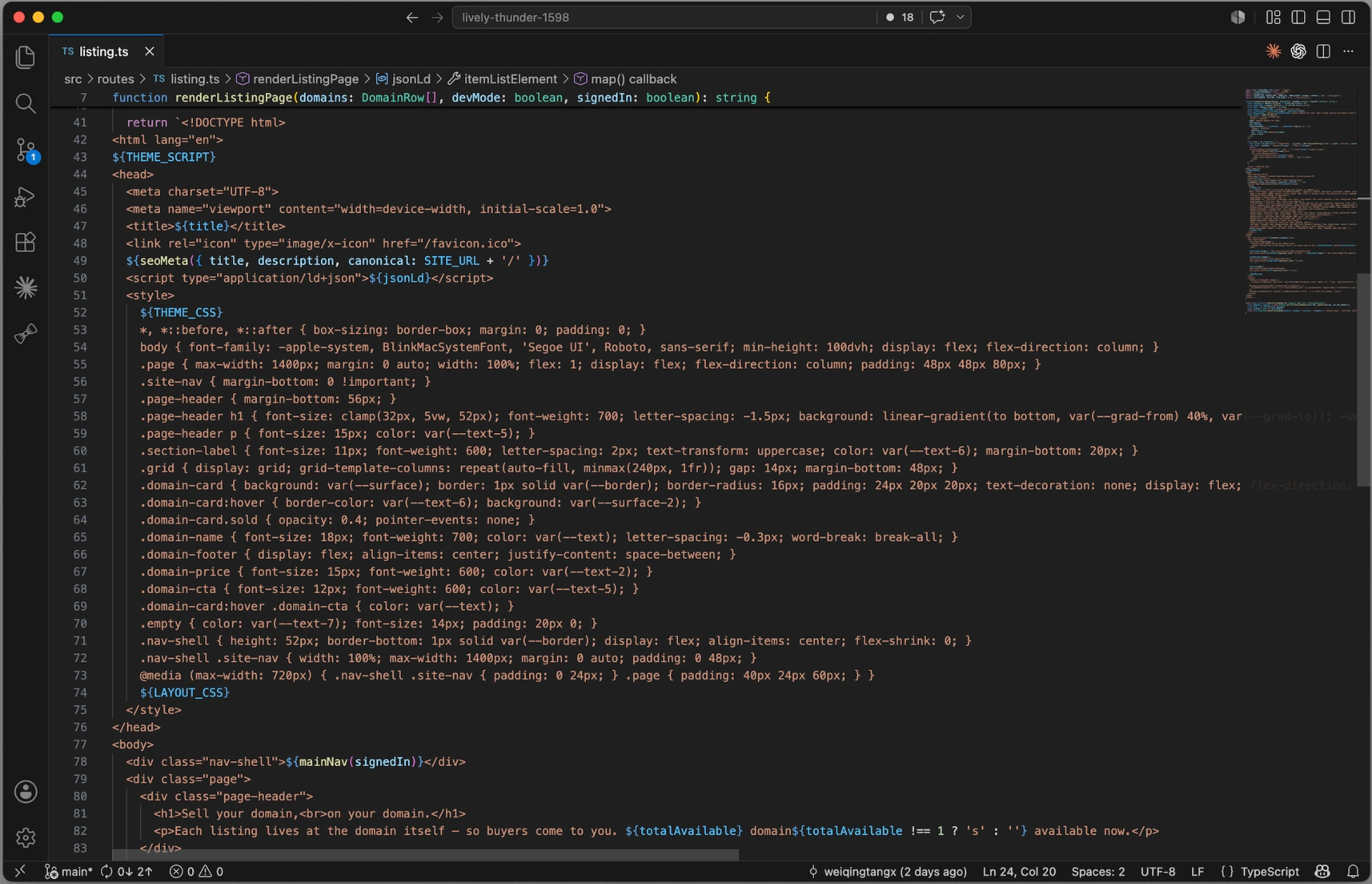
- HTML as template literals: every page is a function that concatenates strings and returns
new Response(html, ...). - Cloudflare D1: SQLite, managed by Cloudflare, running at the edge.
- Web Crypto API: JWT auth built into the Workers runtime. No library needed.
Writing HTML as string templates sounds miserable for a human. But I am not the one writing it. AI is. It turns out LLMs are very good at generating HTML strings. What would take me an hour of typing JSX takes about thirty seconds with a good prompt.
What Surprised Me
I expected Cloudflare to be good for compute. I did not expect it to be good for everything else.
Here is what I am using, all from Cloudflare:
- Workers: deploys my project. Because there is no framework build step, no npm tree to install, it is just TypeScript compiled to a Worker script. Deploys take a few seconds. My Next.js sites on Vercel can take over a hundred seconds.
- D1: stores all the domain data. SQLite at the edge. Free to start.
- Turnstile: bot detection and visitor counting. It filters bots out of my analytics so I get real human visitor counts.
- Email: for communicating with users. I can send transactional emails directly through Cloudflare.
- DNS: when a user transfers a domain to list it, the DNS is hosted right there in the same dashboard.
The one thing that pulled me outside of Cloudflare is Google Auth. If you want users to sign in with Google, you still have to go through Google Cloud Console to generate a client ID and secret, and then complete Google's brand verification process. That is just Google's requirement, nothing to do with Cloudflare. For email, Cloudflare now handles both inbound and outbound, so I integrated everything there too. The one caveat: outbound sending requires a paid plan at $5 a month. That is still a small number for what you get, and it keeps everything inside one platform.
One Dashboard, One CLI
The thing I underestimated was how much I was context-switching with my old stack. Vercel for deploys, Supabase for the database, Google for email, a separate DNS provider. Four tabs open, four sets of credentials, four places something can break.
With Cloudflare, it is all in one place.
The CLI is genuinely powerful. I can manage DNS records, configure email routing, deploy the project, and query the database. Most of it from the terminal without touching the dashboard. For someone who prefers to stay in a terminal, that matters.
What I Would Tell Someone Considering It
Cloudflare Workers is not a drop-in replacement for Next.js. If you are building something with complex UI, a lot of React state, or a large component library, Workers might not be the right call. The no-framework constraint is real.
But for a focused project (a domain marketplace, a tool, an API, something where the pages are simple and the logic is in the data) it is a surprisingly complete platform. The free tier is generous. The CLI covers almost everything. And the deploy speed alone changes how you think about iteration.
I went in skeptical. I came out using it for a real project.
c22k.com is live. The domains are listed. If you have been on the fence about Cloudflare Workers, it is worth an afternoon to try it.